When accounting practices decide to improve their document workflows, they almost always begin in the same place:
- The process that gets complained about most.
- The inbox that looks chaotic.
- The task everyone dreads.
- The step that comes up in every team meeting.
Sometimes that instinct is right.
More often, it leads firms to invest energy in tidying up a visible irritation while the real operational cost sits quietly elsewhere, draining hours and margin week after week.
The First Mistake: Starting With What's Loudest
A firm identifies a frustrating workflow, implements a tool or process change, and things look tidier on the surface. But a few weeks later, the team still feels buried. The improvement didn’t move the needle because it targeted the wrong problem.
This happens because, in practice, document friction isn’t really about volume. It’s about the cost of uncertainty.
A lower-volume process can be far more expensive than a high-volume one if it repeatedly triggers manual review, internal handoffs, missing information, rework, or awkward client follow-ups. A task that seems manageable in isolation becomes a drag on the entire practice once you account for all the checking that surrounds it.
For a practice processing several hundred invoices a month across multiple clients, those “small” errors compound into thousands of pounds in unbilled or wasted time annually.
A Better Question to Ask
Instead of “which process annoys us most?”, the more productive question is: which document workflow creates the most avoidable human effort around validation, clarification, and correction?
In practice, the strongest automation candidates tend to share a few characteristics. They happen frequently enough to matter.
They involve documents or data that arrive in inconsistent formats. They require someone to verify the same types of information over and over. And crucially, when they go wrong, the impact doesn’t stay contained, it ripples outward, delaying other work and creating follow-up tasks for colleagues or clients.
For many UK accounting practices, purchase invoice processing fits this profile almost perfectly. Invoices arrive as PDFs, email attachments, photographed receipts, and occasionally handwritten notes, often from the same client in multiple formats within a single month.
Each one needs supplier identification, date verification, line-item extraction, VAT categorisation, and account coding. When any of those steps go wrong, the error cascades: incorrect VAT returns, misallocated expenses, queries from clients, and rework during year-end.
Why Generic AI Often Disappoints?
A general-purpose AI tool like ChatGPT might handle clean, typed PDFs reasonably well. But accounting document workflows aren’t clean. They’re messy, inconsistent, and full of edge cases – handwritten annotations, multi-page invoices that need splitting, suppliers who change their invoice format quarterly.
If the tool still requires heavy manual checking after processing, or if the cost of using it scales faster than the value it creates, the workflow hasn’t genuinely improved. The checking effort has simply moved from one step to another.
The distinction matters because industry benchmarks show just how large the gap is between manual and well-automated processing.
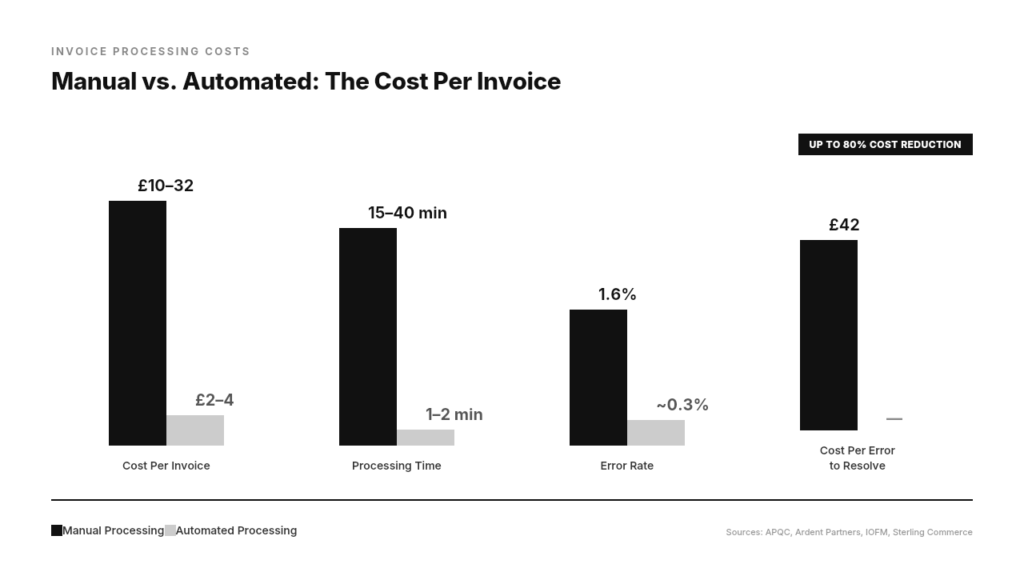
Manual invoice handling costs between £10 and £32 ($12–$40) per invoice, depending on complexity, while properly automated systems bring that down to £2–4 ($3–$5) per invoice – a reduction of up to 80%.
But that saving only materialises when the automation is specific enough to handle the real documents your practice receives, not just the tidy ones in a vendor demo.
What Good Automation Actually Looks Like?
The best workflow improvements in accounting share a common trait: they reduce the checking burden rather than simply moving it. That means the tool needs to be accurate enough on messy inputs that the accountant’s role shifts from “verify everything” to “review exceptions.”
This is the principle behind EazyCapture.
Rather than offering a generic document scanner and hoping it works for accounting, it’s built specifically for the documents UK practices actually handle.
This includes handwritten receipts, multi-page supplier invoices, and inconsistent client submissions.
It extracts line items, detects VAT rates, codes against the client’s existing chart of accounts, and flags anything uncertain for human review.
Start With the Checking, Not the Chaos
If you’re evaluating where to focus your next workflow improvement, resist the pull of the loudest problem.
Instead, map where your team’s checking effort is most disproportionate to the value of the task itself.
That’s where automation will deliver the most meaningful return, not just on paper, but in the daily experience of running your practice.
EazyCapture reduces the checking burden on purchase invoice processing for UK accounting practices – handling messy documents, extracting data accurately, and publishing directly to Xero or QuickBooks. Start a free trial at eazycapture.com.