Automated invoice processing has a straightforward value proposition. Instead of manually keying supplier invoices into accounting software, AI extracts the data, categorises it, assigns the correct VAT rate, and posts it to the ledger. The economics are well documented: manual processing averages 2.88 per invoice, while AI-powered automation brings that down to as low as .36. That is an 80% cost reduction, according to industry benchmarks from APQC and Ascend Software.
But the cost savings only materialise if the tool works. And for many firms, the first month of adoption tells a different story.
The Cold Start Problem
Most invoice capture tools use a training-based approach. The system observes how a firm’s team categorises transactions, assigns VAT, and maps suppliers to nominal codes. Over time, it learns to replicate those decisions.
The logic is reasonable. The timing is not.
A new firm, a new client, or a new supplier has no historical transactions for the system to reference. Some tools require at least three consistent historical transactions per supplier before they will process automatically. Others need five or more. For a firm onboarding a new client with 200 suppliers, that means the first several hundred invoices still require manual review.
This is the cold start problem. The tool promises automation, but delivers a training period. During that window, the team is doing the same manual work they were doing before, plus the overhead of correcting the system’s early guesses. The result: more friction, not less, during the exact period when the firm needs the tool most.
It is also the single biggest reason firms abandon automation tools in the first month.
What the Cost Data Actually Shows
The gap between manual and automated processing is dramatic when automation is fully operational:
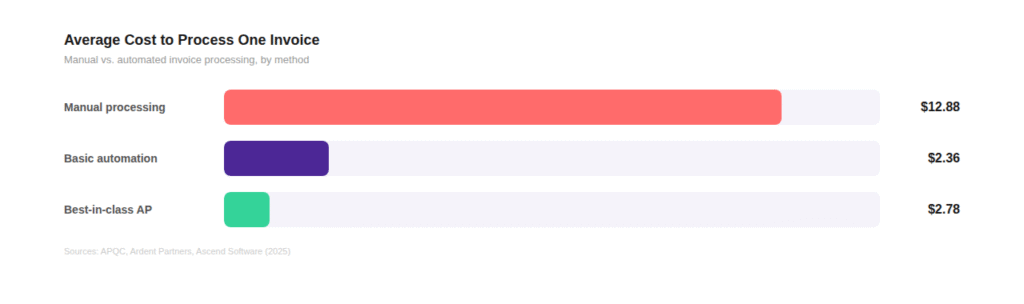
Best-in-class AP teams achieve exception rates of just 9%, meaning 91% of invoices flow through without human intervention. The average firm sits at 22%. The difference is not talent. It is whether the automation handles routine invoices from the start or forces the team through a learning curve.
34% of businesses still process invoice data entirely by hand.
Among those that have attempted automation and reverted, poor first-month accuracy is consistently cited as the reason. The tool worked eventually. It just didn’t work soon enough.
Training-Based vs. Context-Based: The Core Difference
The distinction between tools that work on day one and tools that require a warm-up period comes down to how they get their intelligence.
Training-based systems learn from what the team does. They observe historical postings and replicate patterns. This means every new client, every new supplier, and every new category is a blank slate. The system needs enough data to form a pattern before it can act autonomously.
Context-based systems start from the firm’s existing infrastructure. They read the chart of accounts, understand the client’s business type, and apply the relevant tax legislation before seeing a single invoice. The intelligence comes from structure, not from repetition.
The practical implications are significant:
For a firm processing invoices for a new client on day one, this is not a marginal difference. It determines whether 500 invoices get automated or 500 invoices get manually reviewed while the AI watches.
“A system that requires weeks of training before it delivers value is not automation. It is a promise with a waiting period.”
How EazyCapture Handles the First Invoice
EazyCapture uses the context-based approach. When a firm connects its Xero or QuickBooks account, the system reads the chart of accounts, identifies the client’s business type, and applies HMRC VAT legislation from the first upload.
What this means in practice:
- A multi-page PDF containing ten invoices is separated and processed individually. No training period.
- A new supplier is categorised using the chart of accounts and business context, not historical data.
- VAT is assigned using embedded legislation (20%, zero-rated, reverse charge, exempt) rather than learned from past posts.
- Prepayments are detected. CIS deductions are handled. Line items are split when VAT rates differ between lines.
Invoice #1 is processed with the same logic as invoice #10,000. No warm-up. No degraded accuracy window. No manual intervention during onboarding.
What to Ask Before You Choose a Tool
For firms evaluating automated invoice processing options, the cold start question is worth raising directly:
- How does the system handle a new client with zero transaction history? If the answer involves a learning period, ask how long and what accuracy looks like during that window.
- What is the minimum number of invoices before full automation activates? Context-based systems should work from the first upload.
- How is VAT assigned? Learned behaviour can replicate past mistakes. Legislation-based assignment applies the correct rate regardless of history.
- What happens when a supplier the firm has never processed appears? This is where training-based systems have no reference point.
The answers to these questions separate tools that automate from tools that merely assist after a waiting period.
The Bottom Line
The economics of automated invoice processing are clear. An 80% cost reduction. Cycle times compressed from weeks to hours. Staff freed to focus on advisory work instead of data entry.
But those benefits only materialise if the tool delivers value from day one. A system that needs weeks of manual review before it reaches full accuracy is not saving the firm time. It is deferring the savings while consuming the same resources it was supposed to replace.
The firms seeing the fastest return on investment are the ones that chose tools built on context rather than history. The difference is felt on the first invoice.
Start with a trial of EazyCapture.