
This article follows a single invoice through a spreadsheet-based accounting workflow. Step by step, from the moment it arrives to the moment it posts. The firm is fictional. The failure points are not.
The Firm
A UK practice. Twelve staff. Around 180 clients, mostly SMEs. Bookkeeping, VAT returns, year-end accounts. The firm uses Xero for client accounting but processes incoming invoices through a combination of email, a shared Excel tracker, and manual data entry. The system has been in place for years. It works. Nobody loves it, but nobody has replaced it either.
Step 1: The Invoice Arrives
A supplier invoice for £2,460 lands in a junior bookkeeper’s inbox at 9:14am. It’s a PDF, two pages, from a catering supplier. The bookkeeper opens it, reads the total, and switches to the shared Excel tracker.
The tracker has columns for date, supplier, invoice number, net amount, VAT rate, VAT amount, gross, category, and status. The bookkeeper types in each field manually.
Time spent: about 3 minutes.
Error introduced: the net amount is entered as £2,640 instead of £2,460. A transposition. The kind of mistake that manual data entry research consistently shows occurs in 1% to 4% of entries. At this point, nobody notices.
Step 2: The VAT Calculation
The spreadsheet has a formula that calculates VAT at 20% based on the net amount entered in column E. Because the net figure is wrong, the VAT calculation is also wrong. The gross total now reads £3,168 instead of £2,952.
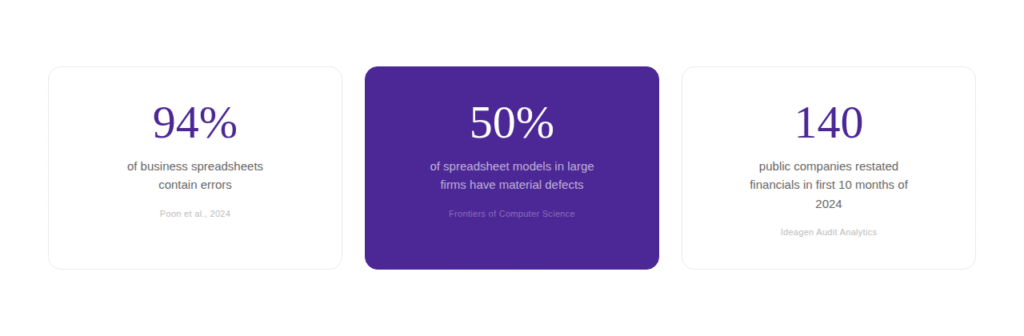
The formula is technically correct. It did exactly what it was told. But it has no way of knowing the input was wrong. A 2024 peer-reviewed study across 35 years of research found that 94% of business spreadsheets contain errors. This is how most of them happen. Not through broken formulas, but through unchecked inputs feeding into valid calculations.
Step 3: The Category Assignment
The bookkeeper assigns the invoice to “Entertainment” based on the supplier name. But the invoice is actually for staff meals at a training event, which under current rules qualifies for different tax treatment than client entertainment.
The spreadsheet has a dropdown for categories, but it doesn’t know the business context. It can’t distinguish a client lunch from a staff training meal. That distinction requires either domain knowledge or a system that learns the firm’s chart of accounts. The spreadsheet has neither.
Step 4: The Second Entry
Later that afternoon, the bookkeeper opens Xero and re-enters the same invoice from the spreadsheet into the accounting system. This is the second manual touchpoint for the same data. The transposition error from Step 1 now lives in both systems.
Research published in Quality Magazine shows that when data passes through two manual entry points, the effective error rate can affect up to 40% of records. Not because each entry is wildly inaccurate, but because two opportunities for error per record compound at scale.
Step 5: The Reconciliation
At month-end, the senior accountant reconciles the bank feed against the spreadsheet. The bank shows a payment of £2,952 to the catering supplier. The spreadsheet shows £3,168. The difference: £216.
Now someone has to find the mismatch. They open the original PDF. They compare it to the spreadsheet. They find the transposition. They correct it in the tracker. Then they correct it in Xero. Then they re-run the VAT calculation. Then they update the status column.
Time spent correcting: roughly 15 to 20 minutes. For one invoice. The GBTA Foundation puts the average correction cost at 2 per erroneous report. Multiply across the 19% of entries that statistically contain errors, and the annual cost stops being trivial.
Step 6: The Audit Question
Six months later, HMRC opens an enquiry into the client’s VAT return. The inspector asks for documentation supporting the entertainment expenses category. The firm pulls the spreadsheet. It shows a corrected figure, but there’s no audit trail showing who changed it, when, or why. The original PDF is saved in a folder somewhere, but the version history on the tracker was overwritten weeks ago.
Excel has no native version control. No log of who edited which cell. No record of whether the correction was reviewed. For a tool that 60% of financial services leaders describe as “too costly and inadequate” for modern needs, it remains remarkably difficult to replace in practice.
What the Same Invoice Looks Like Without the Spreadsheet?
The same PDF arrives. Instead of a manual workflow, it goes through EazyCapture. The supplier, date, net amount, VAT rate, and line items are extracted automatically. The category is mapped to the firm’s chart of accounts. The entry posts directly to Xero with the original document attached.
No re-keying. No transposition risk. No second entry. No month-end correction loop. No missing audit trail. Accuracy rates between 99.959% and 99.99%. The real cost of the old approach becomes visible only when it’s removed.
The Expensive Part of “Good Enough”
The spreadsheet in this example was not broken. Every formula worked. Every column was labelled. The process was documented and followed. And it still produced an error that cascaded through five downstream steps before anyone caught it.
That is the real cost of “good enough.” Not a catastrophic failure. A slow, invisible accumulation of corrections, rework, and unrecoverable time that never appears on a single line item but is felt in every late night before a filing deadline.
Start with a trial of EazyCapture.