Most people pick an invoice scanner the same way they choose a broadband deal – grab the first one that looks reasonable, assume they’re all basically the same, and move on.
Then six months later, they’re fixing data entry errors at 11 PM on a Saturday night, wondering why they even paid for software in the first place.
The truth is, not all invoice scanners are built the same.
The right invoice data extractor quietly saves you hours every week. The wrong one just moves your problem from paper to screen. And in a UK business environment where VAT rules are nuanced, Making Tax Digital is coming for everyone, and every error has a paper trail straight to HMRC, the features you choose matter far more than the price tag.
Here are the five features that genuinely separate a great invoice scanner from an expensive disappointment.
1. OCR That Actually Understands Context (Not Just Characters)
Optical Character Recognition (or OCR) is the engine inside every invoice scanner.
It’s what reads your document and converts it into structured data. Every scanner on the market will tell you its OCR is accurate. What most won’t tell you is that basic OCR is only half the job.
Here’s the problem: OCR reads characters. But it lacks context.
A supplier might write “£1,200.00 + VAT” on one invoice and “Total (incl. VAT): £1,440” on another. A basic OCR tool extracts both numbers, but can’t tell which is the net figure and which is the gross. The result? Incorrect data, silently entered into your books.
The scanners worth your time (like EazyCapture) use a combination of OCR and machine learning that understands layout, not just text.
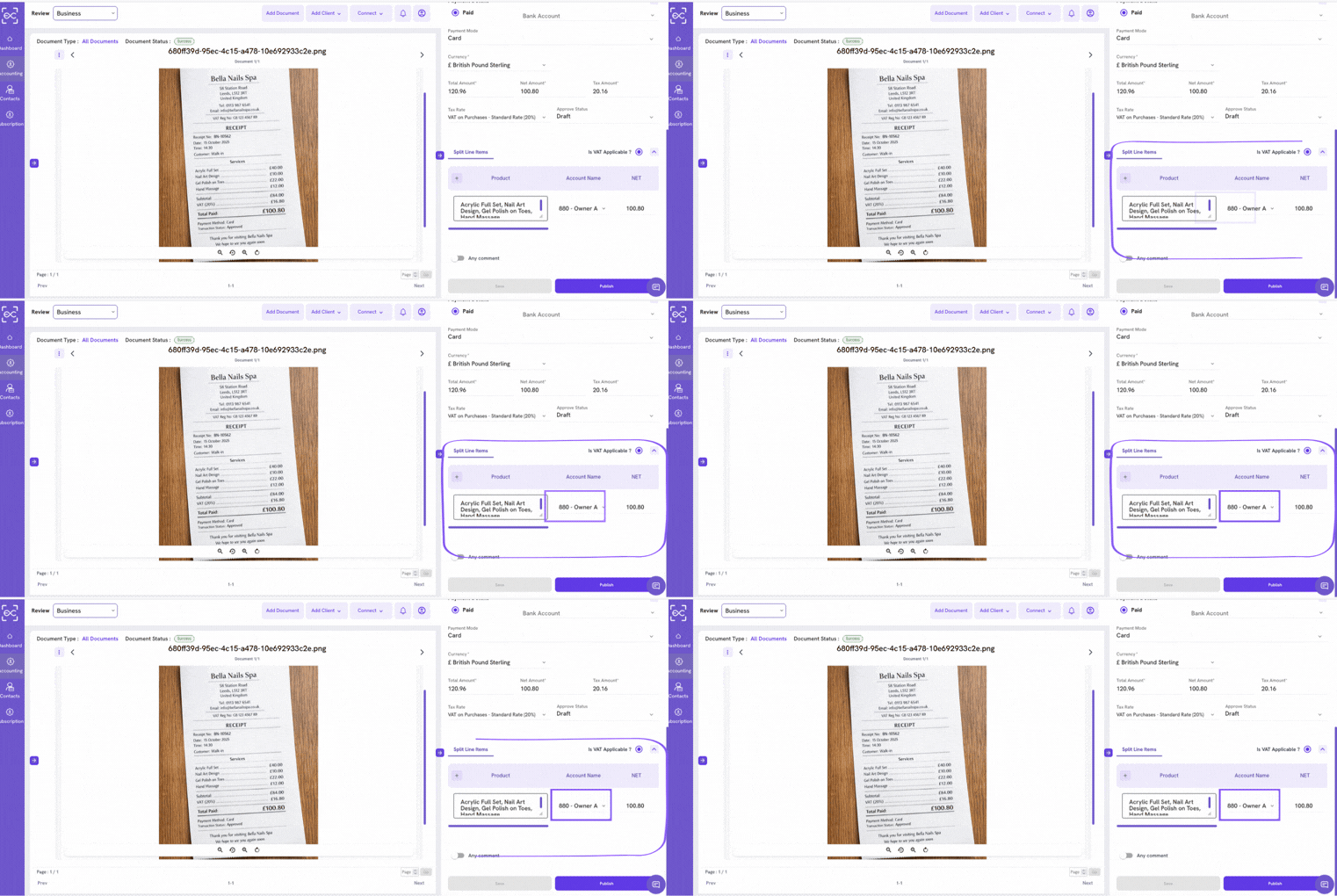
They’ve been trained on thousands of invoice formats, so they can identify a total amount, a VAT number, a supplier name, and a due date, even when they’re in completely different positions on the page.
If your scanner can only handle a clean, single-page supplier invoice from a large retailer, it’s going to struggle the moment reality gets a bit messier – which is most of the time.
2. Smart VAT Handling - Not Just VAT Detection
This one is specifically for UK businesses, and it’s more important than most people realise.
UK VAT is not a single thing.
There’s a
- Standard rate (20%),
- Reduced rate (5%),
- Zero-rated supplies
- and exempt supplies.
These categories have real, meaningful differences.
Zero-rated items are technically taxable but at 0%, meaning you can reclaim input VAT on costs related to producing them. Exempt items are different: you can’t reclaim VAT at all. Confuse them, and your VAT return is wrong.
Most invoice scanners will detect that a VAT number exists and extract a VAT figure. Very few will help you determine which VAT treatment is correct for each line item on the invoice – and that’s where the real complexity lives.
A good invoice scanner doesn’t just read the VAT number off a document. It prompts you with the right VAT treatment based on the supplier type, alerts you when something looks inconsistent, and flags potential errors before they propagate into your returns.
The difference between “the scanner found a number with a £ sign next to it” and “the scanner understood what that number means in your UK tax context” is the difference between a tool and a liability.
And EazyCapture provides that.
3. Multi-Page Document Intelligence
Here’s a scenario that happens more often than vendors like to admit.
You have a six-page invoice from your solicitor. You scan it. Your invoice scanner creates six separate records – one for each page. But now you have to manually merge them, delete five records, and check that the data from the first page carried through correctly.
Or: you scan a batch of invoices in a single photo or upload, which gives you three different documents on the same PDF. Your scanner either processes them as one record (wrong data everywhere) or fails to process the batch at all.
Multi-page document intelligence is the ability to recognise that a document spans multiple pages and that a batch upload contains multiple separate documents.
It sounds basic. But it isn’t.
Many widely-used tools still handle this poorly, which turns high-volume invoice processing into a manual cleanup exercise.
For businesses processing large numbers of invoices, this feature isn’t a nice-to-have. It’s the difference between automation that actually saves time and automation that creates new admin.
4. Two-Way Accounting Software Integration
For an invoice scanning software, the quality of the integration determines whether you’re actually saving time or just moving work around.
A proper two-way integration does more than push data out.
It pulls data in (including your existing chart of accounts, your supplier list, and your tax codes) so that when a scanned invoice comes in, the scanner already knows what category it belongs to, what nominal code to apply, and which VAT treatment your accountant has set as default for that supplier.
The first time you process an invoice from British Gas, you tell the system how to categorise it. Every invoice from British Gas after that? It’s done automatically.
This is also directly relevant to MTD compliance. Under Making Tax Digital for Income Tax, your data needs to move from capture to your accounting software via a digital link — no manual re-entry. A solid integration isn’t just convenient; it’s part of your compliance architecture.
5. Exception Flagging and Query Management
Basic scanners deal with these in the worst possible way: they process the invoice anyway, post whatever data they extracted, and leave you to find the error during reconciliation (if you find it at all).
The scanners that are actually useful do something different. They flag the exception before it enters your books.
This is called query management, and it’s the feature that accountants and bookkeepers value most highly, even though it’s rarely the one that gets marketed loudest.
When an invoice arrives with a missing field, an unusual amount, or something that doesn’t match your existing supplier data, the scanner raises a query — a structured flag that sits in a review queue until a human resolves it.
The result is a clean, auditable workflow.
- Nothing gets posted until it’s been reviewed.
- Errors don’t compound.
- Your accounts stay accurate in real time, not just after your annual tidy-up.
For businesses preparing for MTD, this matters enormously. Quarterly submissions to HMRC require reliable, up-to-date data. You can’t submit a “we’ll fix it later” quarterly update. The data needs to be right at the point of submission.
The Feature That Ties It All Together: Simplicity
One thing worth saying before you go evaluate tools: all five of these features are only valuable if the software is simple enough that people actually use it.
EazyCapture was built specifically for UK businesses – with UK VAT rules, CIS deductions, and MTD compliance baked in from the start, not bolted on as an afterthought.
It handles multi-page documents, learns your suppliers, flags exceptions before they become errors, and connects directly to your accounting software without a CSV in sight.
If you want to see the difference between software that processes invoices and software that actually understands them, try EazyCapture and see how long it takes before you wonder how you managed without it.